 WriterMorph
Help › Projects & Data
AI connections (Claude Code and Codex)
Let an AI app you already use on your Mac read your project, add cards and build HTML pages inside it.
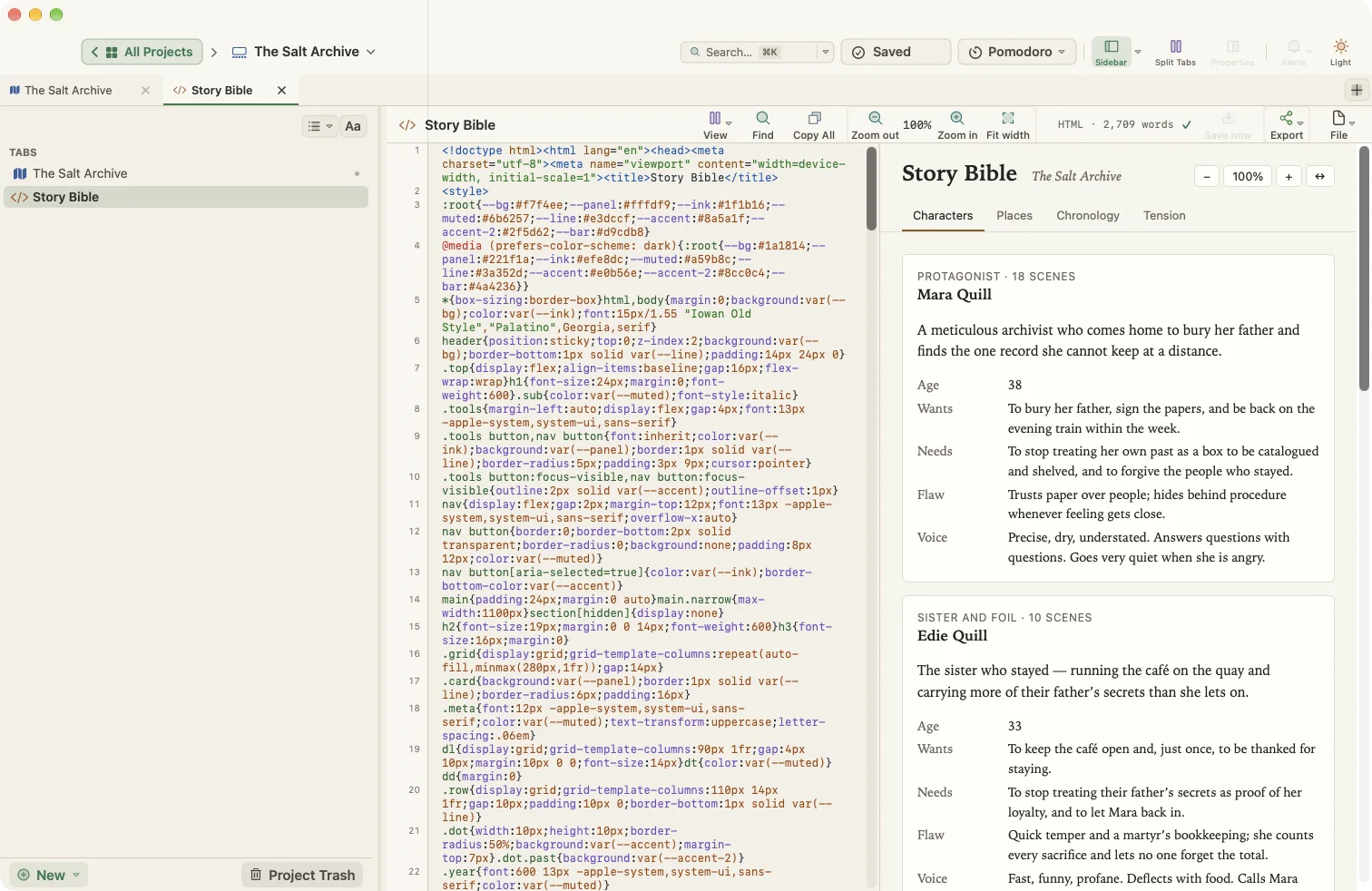
WriterMorph has no AI of its own. If you use Claude Code or Codex on your Mac, you can let it work in the project that is open in WriterMorph. It can read and write cards, tabs, HTML pages, notes and binder documents, search the project and compile it.
The connection is off by default and nothing runs while WriterMorph is closed.
Turn it on
- Open Settings (⌘,) and choose AI Connections.
- Turn on Let AI apps on this Mac (Claude Code, Codex…) work with WriterMorph.
- Leave Allow changes off if you only want the assistant to read. Turn it on to let it add and edit cards and tabs.
- Allow deleting is a separate switch. Deleted cards and tabs go to the Trash.
Connect your AI app (one time)
Under Connect an AI app, pick Claude Code or Codex.
- Copy the command shown and run it once in Terminal.
- Open Claude Code (or Codex) and ask in plain words.
Check the connection with claude mcp list. To disconnect, run claude mcp remove writermorph. For Codex, use codex mcp list and codex mcp remove writermorph.
Things to ask for
- "Make a tabbed HTML page from this document and open it in a new tab."
- "Build a story bible with tabs for characters, places and chronology."
- "Write a two-line summary for every card that has none."
- "Turn the sections of this document into cards under Chapter 3."
- "Make a results dashboard from Table 4.1."
HTML pages
When you ask for a page, report or dashboard, the assistant creates a new HTML tab in the project. These pages:
- follow WriterMorph's light or dark setting,
- have zoom and full-width controls in their header,
- remember their inner tab and zoom,
- are saved inside the
.wmorphproject file, so they travel with it.
The HTML tab shows the source code beside the live page, and you can edit the source.
Safety
- The connection only accepts requests from your own Mac and needs a private key. Create New Key… under Security replaces the key; the old setup command stops working.
- Changes from the assistant can be undone with ⌘Z.
- Recent activity lists what the assistant did.
- What the assistant sends to its own service is covered by that provider's terms. WriterMorph itself sends nothing.